
Best Router for Small Business: Office Wi-Fi Picks
The best router for small business offices of 2 to 25 people: Omada and UniFi picks, 4G backup, mesh for non-IT owners, and an office-size chooser.
The best router for small business offices of 2 to 25 people is a business gateway managed through a single app, with a separate guest network to keep visitors away from your own equipment. For most small offices, TP-Link Omada is the best starting point. Choose the Wi-Fi 6 ER706W for a tiny office, or the ER605 with ceiling-mounted access points as your team grows. UniFi is a good alternative if someone on the team enjoys networking. If losing your internet connection means losing sales, consider the ER706W-4G.
This guide draws on DiagnosticSignal's small business router guide, Packetsaver's UniFi vs Omada comparison, TP-Link's own picks by scenario, TP-Link UK specification pages and Amazon UK listings. These routers have not been independently tested for this guide.
Quick picks
- Best all-in-one for a tiny office: TP-Link Omada ER706W (router with Wi-Fi 6 built in)
- Best value managed stack: TP-Link ER605 router plus EAP650 or EAP653 access points
- Best ecosystem: UniFi Cloud Gateway Ultra plus U7 Pro access points
- Best with 4G backup: TP-Link Omada ER706W-4G
- Simplest mesh for non-IT owners: TP-Link Deco X50-PoE (home-grade; see the caveats)
- Skip: the router your broadband provider sent, used as your only office network
We may earn a commission if you buy through links on this page. It never changes our verdicts. How we review.
TP-Link Omada ER706W
TP-Link ER605 VPN router
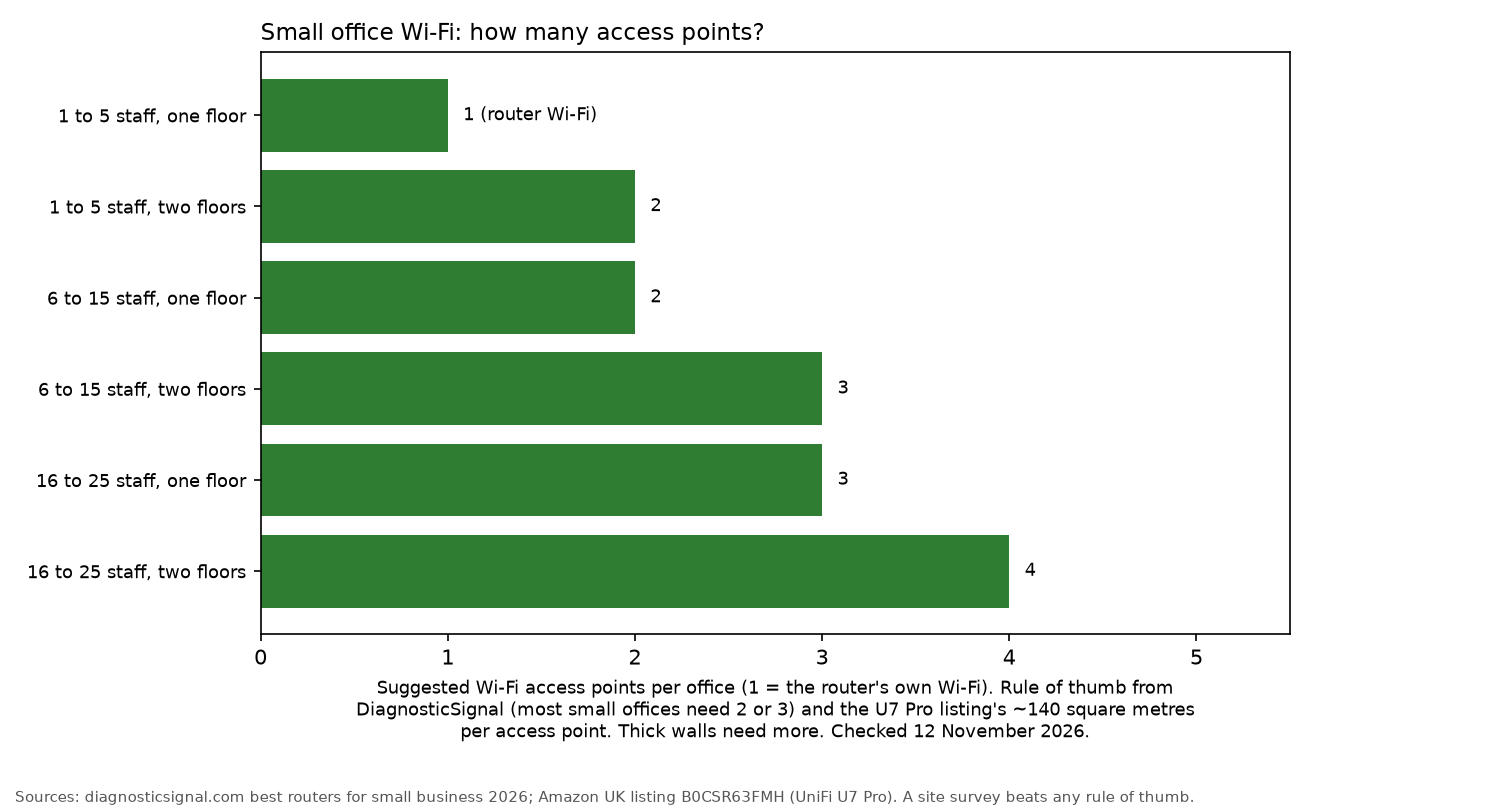
Office-size chooser
| Staff | One floor | Two or more floors | Not for you if |
|---|---|---|---|
| 1 to 5 | ER706W alone (Wi-Fi built in) | ER706W plus 1 Omada access point (meshes without a cable, per TP-Link) | You need more than a few wired desks |
| 6 to 15 | ER605 plus a PoE switch plus 2 access points | ER605 plus PoE switch plus 3 access points (at least 1 per floor) | Nobody can spend an afternoon on setup |
| 16 to 25 | ER605 or ER7206 plus PoE switch plus 3 access points | Add 1 to 2 access points per floor | You need IT support on call; use a provider |
| Any size, line outages hurt | ER706W-4G in place of the ER706W | Same, plus Omada access points | Your building has poor 4G signal |
| Any size, UniFi fan | Cloud Gateway Ultra plus U7 Pro access points | Add a U7 Pro per floor | You want the gentlest learning curve |
How we sized it: DiagnosticSignal suggests that most small offices need two or three access points. The U7 Pro listing quotes coverage of about 140 square metres per access point. Thick walls and stone buildings can increase the number needed, so a short site survey is more reliable than any table.
What matters in a small business router
- Guest network isolation. DiagnosticSignal says you need, at a minimum, a staff network, a guest network with client isolation, and a separate segment for card terminals if you take payments.
- VLANs. These allow separate networks for staff, guests, phones and cameras. Most consumer mesh kits do not handle this properly.
- Dual WAN or 4G failover. A second internet connection or 4G backup should take over automatically if the main line goes down.
- PoE. A PoE switch supplies power to ceiling-mounted access points through the network cable.
- One controller. Omada offers a free controller in the cloud or as software. UniFi gateways run their controller directly on the device.
- Firmware support. Turn on automatic updates. The NCSC's small organisations guide explains how to protect devices and accounts. It also says that 1 in 2 small businesses suffer a cyber incident every year.
The picks
TP-Link Omada ER706W: best all-in-one for a tiny office
The ER706W combines a router with built-in Wi-Fi 6. TP-Link UK lists AX3000 Wi-Fi 6, one gigabit SFP slot and five gigabit ports. It supports load balancing across up to five WAN connections and has a USB 3.0 port for a 4G dongle as backup. WireGuard, OpenVPN and IPS/IDS are also included.
It works with Omada access points, so additional coverage can be added later without replacing the router. TP-Link's own guide names it the best wired Wi-Fi router for a small office, and says it can mesh with Omada access points without an extra cable.
Who it's for: 1 to 5 people, one floor. Who it isn't for: larger offices. DiagnosticSignal prefers dedicated access points once there are more than a few users.
Watch out: the ER706W is sometimes sold by a third-party seller and can be low on stock. Check the seller before you order.
TP-Link Omada ER706W
TP-Link ER605 plus Omada access points: best value managed stack
The ER605 is a wired router rather than an all-in-one Wi-Fi unit. TP-Link UK lists up to three gigabit WAN Ethernet ports, plus a USB port for a 4G modem as backup, and VPN support. Some Amazon bullets fold that USB port into a higher WAN count, so use the UK specification if the two disagree.
Pair it with an Omada PoE switch and access points. The EAP650 is a ceiling-mount AX3000 Wi-Fi 6 access point, and the UK page includes a power adapter. The slimmer EAP653 is also AX3000 Wi-Fi 6, designed for ceiling mounting, and uses PoE+. Its power adapter is not included. Both are listed on Amazon UK.
DiagnosticSignal suggests the larger ER7206 for a standard Omada setup under 50 people. The ER605 provides the same role for smaller teams. This guide does not add a buy button for the ER7206.
Who it's for: 6 to 25 people who want reliable Wi-Fi at every desk. Who it isn't for: owners who want a single box with no setup involved.
TP-Link ER605 VPN router
TP-Link Omada EAP650 access point
TP-Link Omada EAP653 ceiling access point
UniFi Cloud Gateway Ultra plus U7 Pro: best ecosystem
The Cloud Gateway Ultra runs UniFi Network directly on the device. According to the Amazon UK listing, it can manage more than 30 UniFi devices and 300-plus clients. It also offers routing at 1 Gbps with IDS/IPS and multi-WAN load balancing.
The U7 Pro is a ceiling-mounted Wi-Fi 7 access point powered by PoE, with a 2.5 Gbps port. The listing quotes about 140 square metres of coverage. Packetsaver considers UniFi's gateway software a generation ahead on routing and firewall rules. It also points out that TP-Link offers a longer business warranty on its switches than Ubiquiti's 2-year store warranty.
Who it's for: offices with a tech-confident owner or part-time IT support. Who it isn't for: anyone looking for the simplest interface. DiagnosticSignal considers UniFi's learning curve steeper.
Watch out: the Cloud Gateway Ultra has been low on stock. Buyer reviews on the Amazon UK listing say some units arrived with an EU mains plug rather than a UK plug, so check the plug before you order. The U7 Pro is sometimes sold by a third-party seller. Check who is selling it before you order.
UniFi Cloud Gateway Ultra
UniFi U7 Pro access point
TP-Link Omada ER706W-4G: best with 4G backup
The ER706W-4G offers the same AX3000 Wi-Fi 6 as the standard ER706W, with mobile backup built in. TP-Link UK lists a single Nano SIM slot for 4G+ Cat6 at speeds of up to 300 Mbps, along with six gigabit ports. TP-Link's scenario guide says the 4G connection takes over if the wired broadband line fails. That same US guide lists two Nano SIM slots, while the UK specification page lists one.
Who it's for: shops and offices where an internet outage means lost card payments or calls. Who it isn't for: buildings with poor mobile signal.
Watch out: Amazon UK has not been showing a featured offer for the ER706W-4G, so this guide does not include a buy button. Check the listing yourself if you still want to order one.
TP-Link Deco X50-PoE: simplest mesh for non-IT owners
The Deco X50-PoE is an AX3000 Wi-Fi 6 mesh system managed through the Deco app. Its listed features include a 2.5 Gbps port, PoE or mains power, ceiling or wall mounting, and HomeShield security. It is listed on Amazon UK.
It is a home networking system, though. DiagnosticSignal warns that home mesh kits lack real VLAN support, per-device QoS, a proper management dashboard and a VPN server.
Who it's for: 2 to 5 people who need reliable Wi-Fi and a guest network without complicated setup. Who it isn't for: offices with card terminals or VoIP phones that require their own network.
TP-Link Deco X50-PoE
Setup checklist
- Put your broadband provider's router into modem or bridge mode if possible. This ensures only one device handles routing.
- Create three separate networks: staff, guests (with client isolation) and devices such as card terminals.
- Change the admin password and enable two-factor sign-in for the cloud controller.
- Enable automatic firmware updates.
- Connect the router and switch to a UPS. See the UPS for a small office guide.
FAQ
- Do I need a business router?
- If your office has guests, card terminals or more than a handful of staff, yes. You need separate networks and one place to manage them.
- Omada or UniFi?
- Omada is the better choice for lower costs and a simpler start. UniFi offers stronger gateway software, but comes with a steeper learning curve, according to Packetsaver and DiagnosticSignal.
- How many access points for a small office?
- DiagnosticSignal recommends two or three access points for most single-floor offices. Add one for each extra floor.
- What is dual WAN failover?
- Dual WAN failover connects two internet connections to one router. If the main line fails, traffic automatically switches to the second connection or 4G.
More from Site Nurturing: Office tech · NAS for small business · UPS for a small office · How we review